Smart Hard Hats for Lone Worker Safety: How SOS and Fall Alerts Work

Learn how manual SOS and automatic alerts can support lone worker safety, what happens after an alert, and which response requirements to test before choosing a smart hard hat.

Hitesh Gambhava
Nov 27, 202611 min readUpdated Nov 27, 2026
Share:
Share article on LinkedInShare article on X
Smooth-Ridge Hard Hat Worker

A worker who needs help may be able to press an SOS button. A worker who is incapacitated may not. That is why a lone worker safety device needs to be evaluated beyond the presence of an emergency button.

Smart hard hats can support lone worker safety through manual SOS and, where supported, automatic incident alerts. Their usefulness depends on the complete response process: detecting an event, transmitting the alert, identifying the worker, and getting an assigned person to respond.

Before choosing a system, establish what happens if the worker cannot activate it, the connection drops, or the first recipient does not respond. These questions connect product features to the way your site actually operates.

When does a construction worker need lone-worker protection?

A busy construction project can still contain isolated tasks. A worker inspecting an unoccupied area or checking a remote section of a site may be beyond colleagues’ sight or hearing, even while other crews are nearby.

Start with the task and its risk assessment. Identify where the person will work, how contact will be maintained, and how assistance can reach them. Assess whether the task is suitable for lone working before selecting a device.

The UK Health and Safety Executive’s guidance on managing lone-working risks identifies high-risk activities that require another person, including some confined-space and exposed-live-electrical work. A connected hard hat does not remove that need. This is UK guidance; projects in Saudi Arabia and the UAE must assess their applicable local and project-specific requirements.

Write down the approved task, working area, contact arrangements, responsible supervisor, and end-of-task check-in. The device should support that procedure.

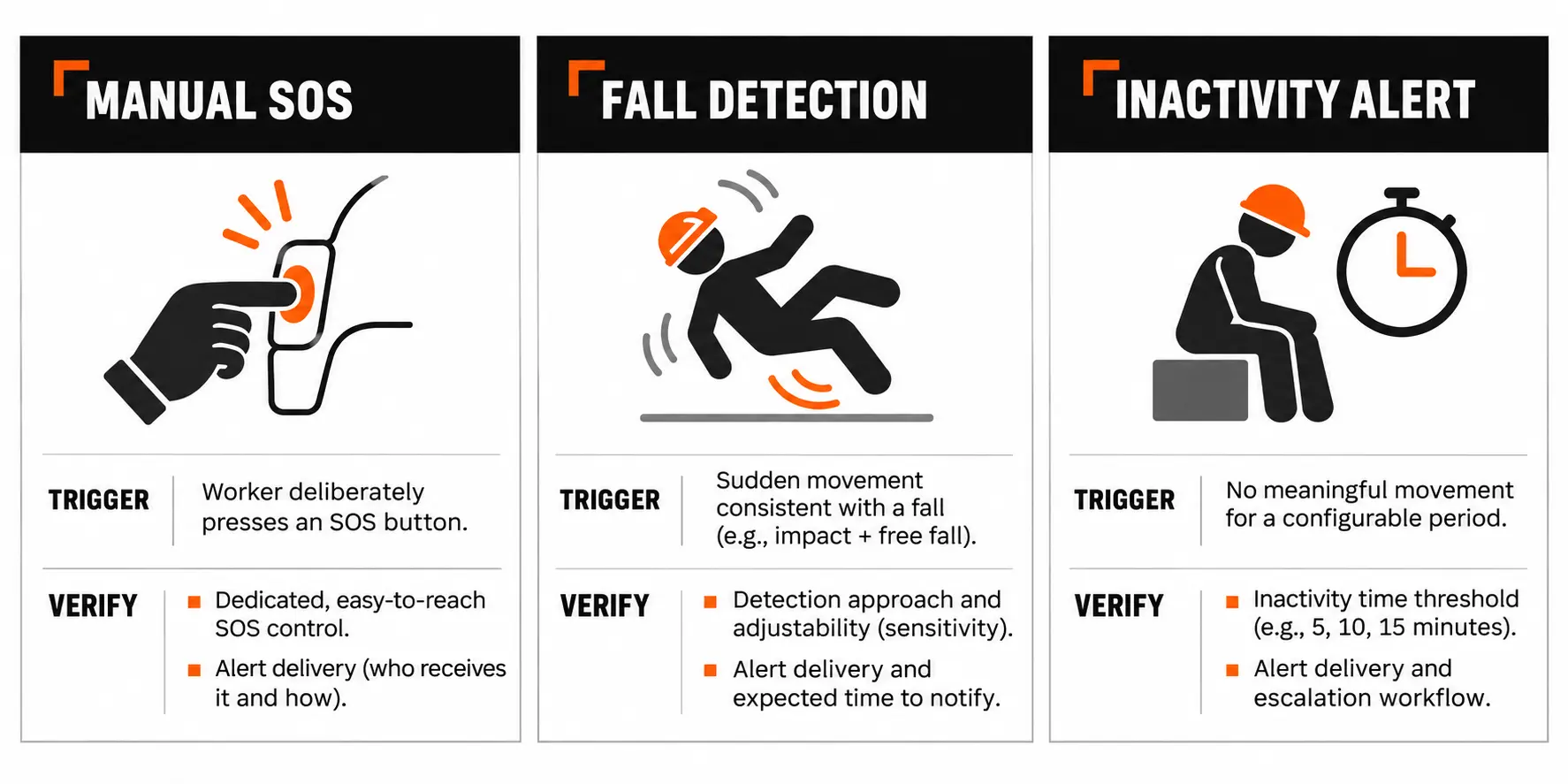
How do manual SOS, fall detection, and inactivity alerts differ?

These functions address different situations. Do not assume that a device offering one automatically includes the others.

FunctionWhat triggers itWhat the buyer must establish

Manual SOS

The worker deliberately activates an emergency control

Button access, activation sequence, confirmation to the worker, and notification destination

Fall detection

The device’s configured detection logic identifies a possible fall

Supported event conditions, limitations, false-alert handling, and approved test method

Inactivity alert

A supported system detects a defined period or pattern of inactivity

Whether this function exists, its settings, and how normal stationary work is handled

Manual SOS depends on worker action

A hard hat SOS button gives the worker a deliberate way to request help. Test whether it can be found and operated while wearing the gloves and other PPE used for the task.

Ask what confirms successful activation. A local beep or vibration may indicate that the button was pressed; it does not necessarily prove that a remote recipient received the alert. Have the supplier demonstrate both.

Automatic detection needs a defined scope

Fall detection is an event-detection function, not a guarantee that every fall or medical emergency will be identified. Ask which conditions the system is designed to recognise and how it handles ordinary movement or a dropped, unworn device.

Inactivity detection is a separate capability. It should not be inferred from the presence of a fall alert. Confirm supported behaviour in the proposed configuration, including any pre-alert, cancellation, or sensitivity settings.

Use only manufacturer-approved simulations when testing automatic alerts. Do not ask workers to stage falls or expose themselves to hazards.

Workplace Safety Alert Infographic

What happens after a lone-worker alert is triggered?

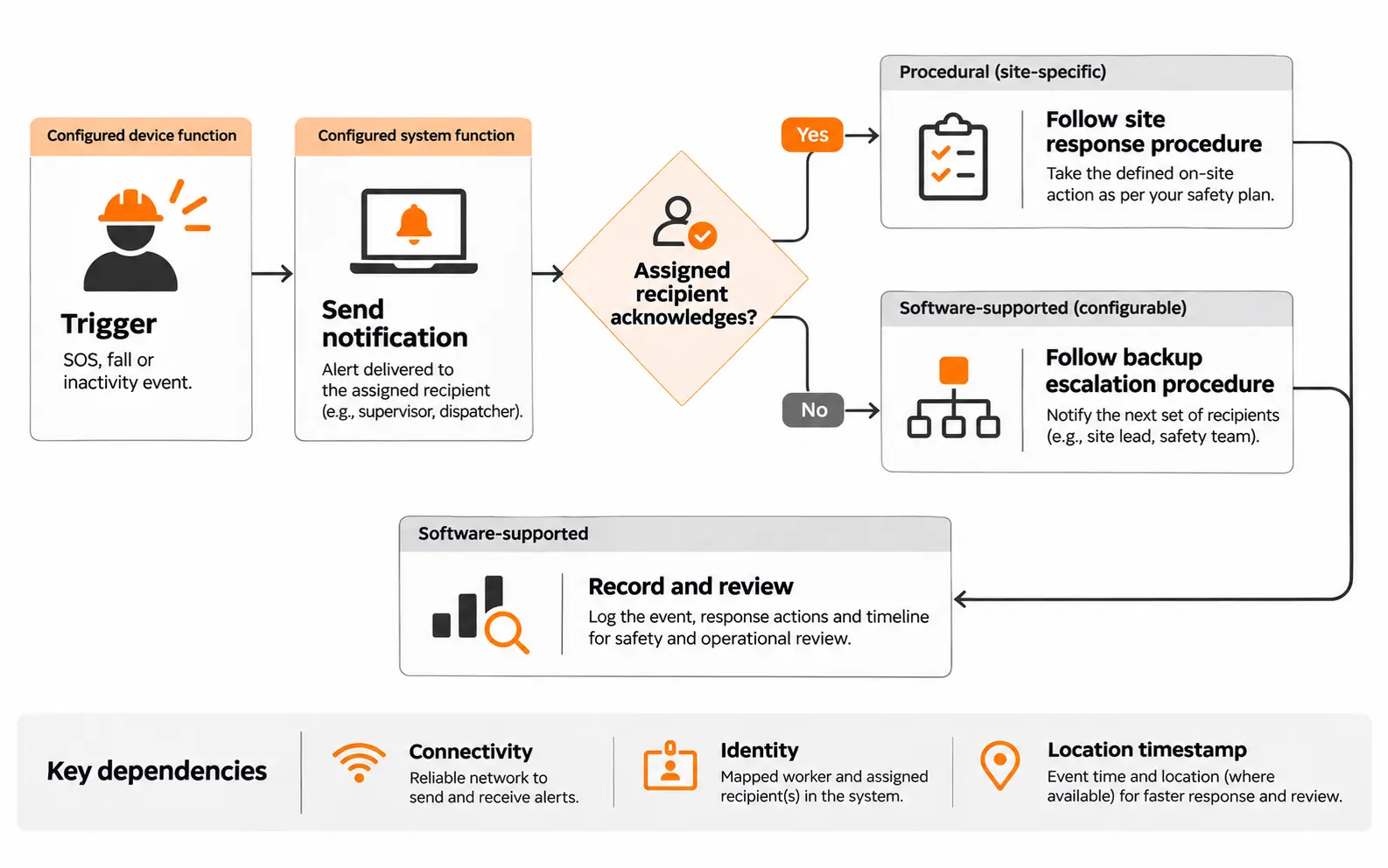
An alert is the start of the response process. Specify the complete workflow, including the steps performed by people.

HSE’s monitoring and communication guidance recommends agreed contact arrangements, manual or automatic alarm methods, and regular testing of emergency procedures. Use those principles to evaluate how the proposed equipment fits your site’s own response plan.

1. Identify the event and worker

The recipient should be able to distinguish a manual SOS from an automatically detected event and identify the assigned worker. Check device assignment at shift handover so the alert is not associated with a previous wearer.

2. Transmit and present the alert

Establish the actual notification path: dashboard, mobile application, or another supported channel. Confirm any network, account, application, or service dependencies.

If alerts rely on a dashboard, test what happens when the assigned supervisor is away from that screen. Do not assume a notification will also arrive by phone or SMS.

3. Check the location and contact options

Ask what location information accompanies the event and when it was last updated. A last-known position can be useful, but it must be distinguishable from a current reading.

For the underlying positioning requirements, see our guide to construction worker location tracking. This matters particularly where a route moves between open areas and enclosed structures.

4. Assign responsibility and escalate

Define who receives the alert, who takes ownership, and what happens if the primary recipient is unavailable. Where acknowledgement or timed escalation is required, confirm whether it is a software function or a step in the site procedure.

Notification delivery, acknowledgement, and response are separate milestones. Measure them separately during a controlled drill instead of relying on a single claim of “instant response.”

5. Record the outcome

Decide how the event will be closed and reviewed. Record the outcome, any contact problems, and whether an accidental trigger or assignment error needs correction. Confirm which records the system provides and which your team must maintain.

Worker Safety Alert Response Flow

What can interrupt the response?

Evaluate normal operation and foreseeable failures together. An impressive demonstration in the site office may not reveal what happens along the worker’s actual route.

Possible gapQuestion to resolve before deployment

Connection loss

Which functions remain available locally, what can reach the supervisor, and what alternative contact procedure applies?

Stale location

Can recipients see when the last position was recorded and avoid treating it as live?

Low battery

Can the device support the intended shift workload, and who acts on low-battery indications?

Missed notification

Who monitors the agreed channel during breaks, shift changes, and out-of-hours work?

False alert

How is an accidental activation cancelled or reviewed without ignoring a genuine event?

Wrong assignment

How do you verify that the device belongs to the worker named in the alert?

A record uploaded after connectivity returns is historical evidence. It is not equivalent to an alert received while assistance was needed. Ask the supplier to explain local detection, remote transmission, and later synchronisation separately.

Train workers and recipients on the functions they will actually use. For multilingual teams, demonstrate the activation and response steps in a language each person understands, then check understanding through practice.

Smart hard hat, phone app, or dedicated lone-worker device?

Choose the form factor around the task, required PPE, and monitoring arrangements. Compare specific configurations rather than assuming that every product in a category behaves the same way.

OptionWhen to evaluate itWhat to check

Smart hard hat

Tasks where approved head protection is already worn and integrated communication or alerts are relevant

PPE suitability, comfort, activation access, supported alert functions, battery and network requirements

Phone application

Tasks where a suitable phone can be carried and used under site policy

Phone availability, operating-system permissions, battery, connectivity, activation method and app operation

Dedicated lone-worker device

Tasks calling for a separate wearable or carried alarm device

How it is worn, supported triggers, communication path, monitoring service and charging process

Head protection suitability remains a separate purchasing requirement. Confirm that the complete hard hat configuration is appropriate for the task and any site requirements. Connected functions do not establish protective performance or certification.

If you need to connect alerts to existing systems or tailor the operating workflow, our comparison of custom and off-the-shelf Smart Hard Hat platforms explains the wider platform decision.

What should you test before choosing a system?

Agree on acceptance criteria with your HSE and operations teams before the demonstration. Use a controlled test that cannot be confused with a live emergency.

Test scenarioEvidence to request

Manual SOS

Observe activation with normal PPE, worker feedback, recipient notification and correct identity

Supported automatic alert

Use the approved simulation and inspect event type, recipient information and cancellation behaviour

Primary recipient unavailable

Demonstrate the actual backup path, whether configured in software or performed by a person

Connection interrupted

Inspect local behaviour, remote visibility, recovery and the agreed alternative contact method

Location outdated

Confirm that the timestamp and last-known status are understandable to the recipient

Accidental activation

Demonstrate cancellation or closure, permissions and the event record

Shift handover

Verify device reassignment, charging arrangements and responsibility for monitoring

Record trigger time, notification receipt, acknowledgement, and response initiation where these can be observed. Set acceptable intervals through your site assessment; do not adopt an arbitrary universal response-time target.

A test passes when the people responsible can complete the agreed workflow with the proposed equipment. Document gaps, corrective actions, and ownership before expanding deployment.

After the acceptance tests, use a structured Smart Hard Hat pilot program to assess everyday use with a defined crew and repeatable review process.

Evaluate Efour’s Smart Hard Hat for your lone-worker workflow

Efour’s Smart Hard Hat brings together wearable hardware and connected software for site use. Start the evaluation with your required workflow and request a demonstration of the current configuration.

Share the isolated tasks involved, working areas, shift length, network conditions, and who will receive and act on alerts. Ask the team to demonstrate the relevant SOS, location, and communication functions, and confirm any automatic-alert requirements separately.

This gives your HSE and operations teams a practical basis for deciding whether the proposed configuration fits the job.

Discuss your lone-worker alert requirements

Tell Efour how your workers operate and how your team responds to incidents. Request a Smart Hard Hat demonstration against your site’s alert and response requirements.

Frequently Asked Questions.

Do not assume it does. An alert to a company dashboard or supervisor is different from contacting emergency services. Confirm the notification destinations and who is responsible for making any emergency call.

The functions address different situations. A worker may need help without falling, while an automatic event alert may be relevant when the worker cannot press a button. Evaluate the supported functions and limitations together.

That depends on the device and communication system. Local detection may continue while remote notification is unavailable. Verify the proposed configuration and define an alternative contact procedure for areas without the required coverage.

No. Suitability depends on the task assessment, controls, training, communication, and response arrangements. The equipment supports those arrangements; it does not authorise work that requires another person.